Plan your GTA 6 progress: personal goals and logbook
A useful logbook helps you pick up where you left off without turning a game into a chore list. Prepare personal goals in Leonida Track, then refine them as you make discoveries.
The examples below are player intentions. They do not describe verified GTA VI missions or completion requirements. You can prepare your logbook now and adapt in-game goals when you can play.
1. Pick three things you want to do
Start with what appeals to you: exploring at your own pace, moving your adventure forward or keeping track of discoveries. Three concrete goals are enough to try the logbook. Add more later rather than trying to anticipate every part of the game.
Turn a broad idea such as “discover everything” into an action with a clear end: “write down three places to revisit”. Your title should help you resume a session, not dictate how you have to play.
2. Create a simple logbook with time estimates
In the personal GTA 6 progress tracker, enter a title, choose a category and duration, then select Add. Menu durations are personal time budgets, not verified mission lengths.
| Personal goal | Category | Budget |
|---|---|---|
| Write down three ideas for my first sessions | Personal challenges | 15 min |
| Set aside time for free exploration | Exploration | 30 min |
| Prepare my personal list of vehicles to discover | Vehicles | 15 min |
You can do the first goal before playing. The other two are plans to refine as you discover the game, without assuming any specific vehicle or activity is available.
3. Use favourites and categories to find your priorities
Star one or two goals you feel excited about. Use filters to find favourites or open goals later. Categories organise your logbook; they do not reproduce an official GTA VI menu.
If a title reveals something you would rather hide, mark the goal as sensitive using its round button. Spoiler protection hides that title in the tracker and planner. The category stays visible, so keep it neutral.
4. Turn your logbook into your next session
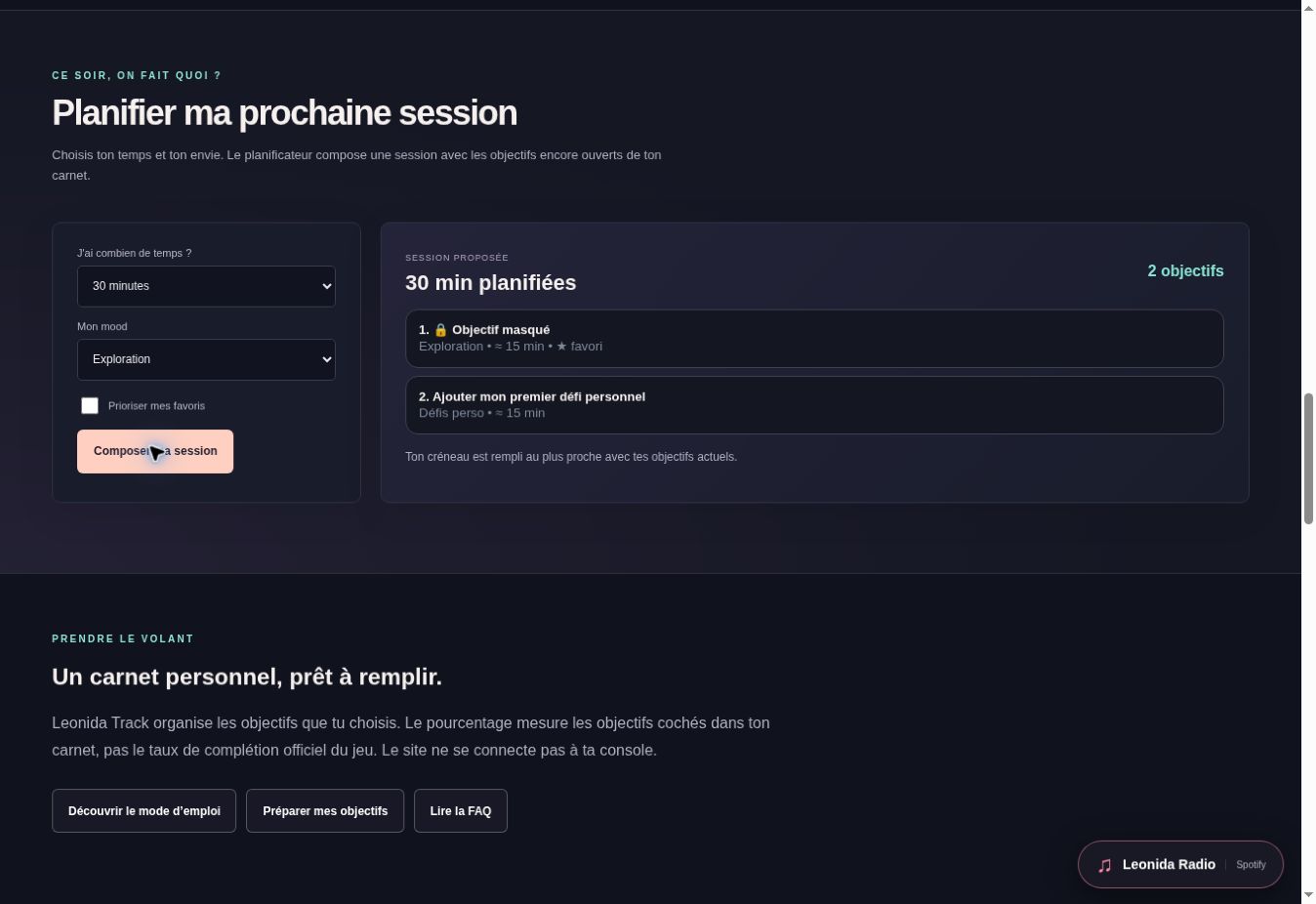
Open the session planner, choose your available time, a preferred category and whether to prioritise favourites. It selects open goals based on your own estimates.
The suggested total stays within your estimated time slot. If no goal fits, choose a longer slot or add a shorter step. Durations are your own estimates: leave room to play at your pace. See the 30-minute session example.
5. Measure your goals, not official 100% completion
Check off a goal when you finish it. Your logbook percentage is completed personal goals divided by the total, so adding or deleting a goal changes the result. It does not measure your in-game save or official 100% completion.
6. Export a copy of your logbook
Your logbook is saved in this browser. Switching between /fr/ and /en/ on leonidatrack.com keeps your goals; changing devices or domains does not transfer them automatically. Export downloads a JSON backup and Import restores it. Importing replaces the current logbook.
Read how the tracker works for the controls and the backup FAQ for local storage limitations.
Turn three intentions into a 30-minute session
Try these personal intentions without assuming anything about the game’s content:
- “Write down my exploration ideas”: Exploration, 15 minutes.
- “Sort my personal leads”: Exploration, 15 minutes.
- “Prepare my next challenge”: Personal challenges, 30 minutes.
Star the first two objectives. In the planner, select 30 minutes, Exploration and favourite priority, then compose a session. If you have no other open favourites, those first two intentions can fill the slot.
The result also depends on your existing objectives and their order. Category is a preference, not a strict filter: the planner may fill time with other categories. Review the proposal before playing.
With only these three goals, completing the first two shows 2 out of 3, or 67% after rounding. If you have more rows, the percentage covers your whole notebook.
Personal tracking versus official completion
| In Leonida Track | What it measures |
|---|---|
| Checked objective | An action you mark as done. |
| Notebook percentage | The share of your own goals marked done. |
| Planned duration | Your time estimates added together, without game data. |
| Resume point | A manual note for your next session. |
The site does not read saves, trophies or console statistics. It does not guarantee an official 100% completion checklist.
A simple end-of-session routine
- Check off only what you consider finished.
- Write a discreet next step in “Resume my game”.
- Export your goals, resume note and secrets notebook using their respective controls to keep a complete copy of your personal notes.
The goals export does not replace the other exports. Before importing, back up existing notes: importing may replace the corresponding data.
Read the GTA 6 spoiler-protection guide for masking limits, or learn about Leonida Track.
Understand Leonida and six destinations showcased by Rockstar →